




The Kawai-EX Pro sample Library is a fabulous, powerfull and bright 9-foot (276cm) KAWAI EX concert grand piano that used to be in the Kennedy center in Washington DC.
We worked closely with Lance Herring on this library (this is our second attempt after the AcademicGrand) and decided to give our project a new dimension, we carefully recorded this extraordinary instrument with 3 microphone pairs and state of the art Gear to try and recreate how powerfull and precise this instrument can be.
We worked closely with Lance Herring on this library (this is our second attempt after the AcademicGrand) and decided to give our project a new dimension, we carefully recorded this extraordinary instrument with 3 microphone pairs and state of the art Gear to try and recreate how powerfull and precise this instrument can be.

 |
Preferences
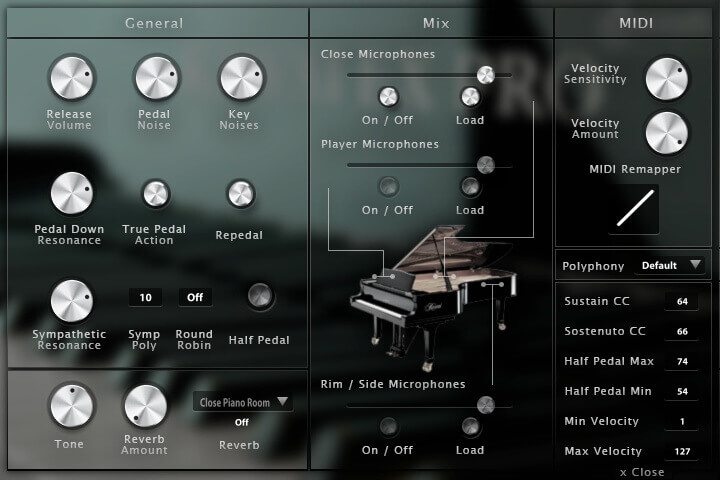
The Kawai EX PRO is now in V3 and includes many new features to make it one of the most complete pianos on the market.
Each feature is detailed below and of course it still contains the features of the previous versions like the release volume, pedal noise and key noise. |
|
|
|
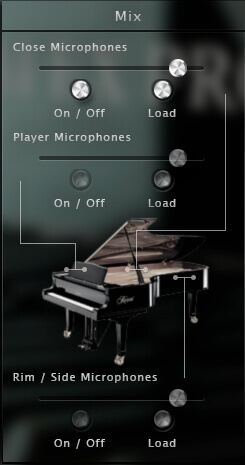
Three microphone positions
We recorded the Kawai EX PRO with three microphone positions:
Each microphone has three different controls:
|
 |
|
|
|
 |
Resonances
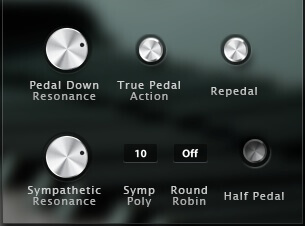
The resonances on a piano give some kind of a reverb effect when all of the strings start resonating.
There are two kinds of resonances that are important to model on a piano, the pedal down resonances and the sympathetic resonances between the held notes. Both these effects are present in the Kawai EX PRO, you can even change the amount of each of them. |
|
Here is in detail what every control offers.
|
|
|
Repedaling / Half pedaling
On a real piano, the pedal is not a simple on and off and in classical music, people often use the repedaling and half pedaling.
|
 |
|
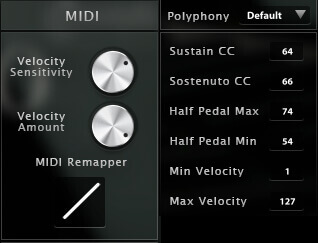
The half Pedal can be enabled or disabled from the interface but you can also control the size of the cc zone where the half pedal effect will occur. Half pedal min and max are the minimum and maximum values of the sustain pedal cc.
|
|
 |
MIDI controls
We added a few midi controls to the older version. The sostenuto and sustain CC can be changed in case you want for example use an expression pedal instead of a regular on off pedal. You can also change the Midi curve, the dynamics and the velocity response to really adjust the library to your liking, keyboard and playing style.
|
|
|

Sample player
 Technical description
|
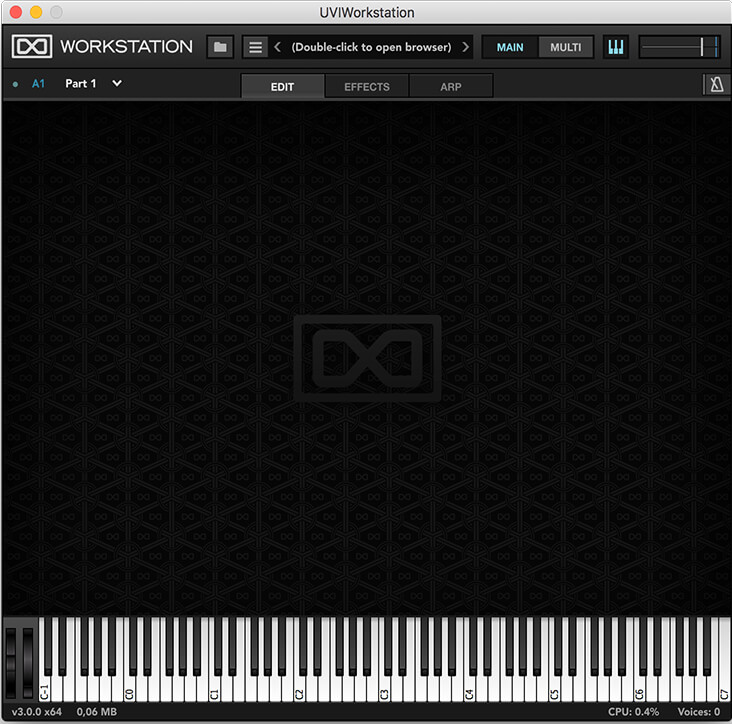
KAWAI-EX PRO comes with its own sample player, the UVI Workstation 3 (requires v3.1.6 or later). We provide it for free with every library that you buy, you don't need to buy an expensive sampler to use our products. It works on Mac (10.14 or later intel or arm processor) and PC (windows 10 or later), in standalone or as a plugin (VST / VST3 / AU / AAX ) and in 64 bits only. You can find more info about it here. |
10.9Gb uncompressed, 2.15Gb compressed in lossless flac format, around 5000 samples.
3 microphone positions that you can mix from the interface.
5 Velocity layers for the sustain (5 on pedal up and 5 on pedal down).
3 sets of 5 Velocities for the release, one for different sustain lenght (staccato).
Pedal down resonance.
Key noises samples.
Sustain pedal noises (up and down), triggered automatically.
Advanced UVI scripting giving you access to a simple yet powerfull interface and advanced features.
iLok or computer based
Registration
 
|
We use the iLok system to protect our products and you can choose to register your license to your computer or to an iLok dongle.
If you decide to use an iLok dongle, both V1 and V2 are compatible with our products. You can activate your license on up to 3 computers or iLok dongles at the same time and you can deactivate one and activate another as many times as you want. |

|
Once your order is complete, you will be provided with a serial number.
You will then be able to register it to your iLok account from our website on this page (you need to be logged in to access this page). The whole process is described in the FAQ (instructions + screencast). |
Add review

Add review
June 10, 2016
I have only recently got into making music with a Macbook Pro, having always previously been a hardware user.
I was quite disappointed with the pianos that came with Komplete 9 - really thin and lacking in dynamic range (particularly in comparison to the pianos on my Yamaha S90ES).
The ones that came with Logic Pro X and Mainstage 3 were also fairly uninspiring.
I thought I had made a bad mistake and was thinking about getting rid of the computer gear!
This superb grand has changed my mind!
It's really playable, and has plenty of body and dynamics - highly recommended!
May 14, 2014
http://www.askaudiomag.com/articles/review-kawai-ex-pro-virtual-piano-instrument?utm_source=Twitter&utm_medium=Social&utm_campaign=HubAutoShare&utm_content=review-kawai-ex-pro-virtual-piano-instrument
October 03, 2013
http://fr.audiofanzine.com/piano-acoustique-virtuel/acousticsamples/A-PIAN/editorial/tests/touches-fran-aises.html
October 03, 2013
http://en.audiofanzine.com/virtual-acoustic-piano/acousticsamples/Kawai-EX/user_reviews/
July 26, 2013
i got this one couple of months ago its really amazing sounds perfect .
it took me time to download but it worth waiting
April 27, 2013
I've been looking for a lush sounding Piano VSTi with a relatively compact footprint for some time; primarily for use in the development of electronic music which drew me to the 'Acoustic Samples: Kawai Ex Pro'. This is a wonderfully bright, rich and lively Piano VSTi, with an excellent range of controls and the ability to cut through a mix and remain elegant - awesome sounding and highly recommended! :)
December 24, 2012
Always looking for the holy grail of piano vst's , I do own most after doing a search on youtube for piano vst's found this gem can be tweaked for any style
And I must admit sounds sweet
Your review
Your review*
20 character minimum. Focus on the product and your experience using it.
Share photos and video:
Link to the video
Paste the URL of your video on YouTube or Vimeo
Video title
Video help
- Make sure your video is related to the product.
- Try to submit videos of you using the product.
- Inappropriate videos will be rejected along with your review.
- If you are not the copyright holder, you may not submit copyrighted videos.
Enter the code in the box below: