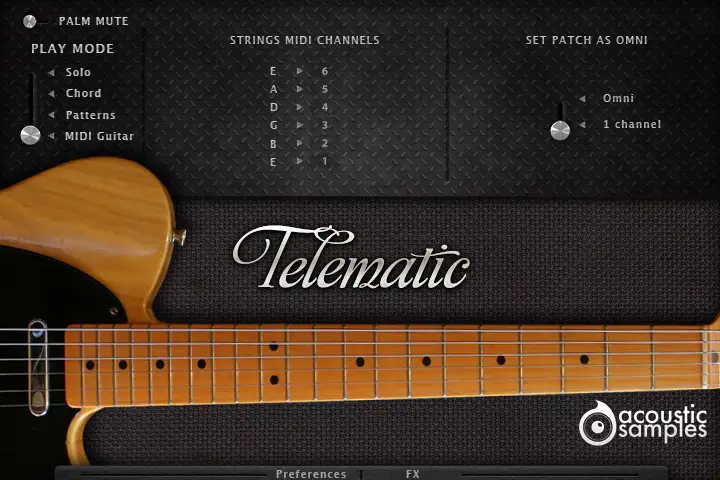
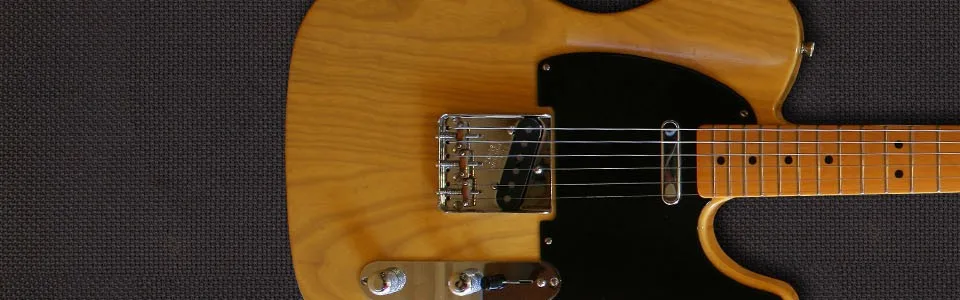
The Telematic V3 is a deeply sampled Fender Telecaster guitar, with both pickups recorded separately to give you the variety of sounds this famous guitar is known for. Every fret of every string was sampled with upstrokes, downstrokes, round robins, releases, staccatos, mutes, slides, hammer-ons, pull-offs, retriggers and fret noises - around 9562 samples in all.
There are four ways to play it, chosen with keyswitches from G5 to C6: the solo mode for melodies, the chord mode for easy strumming and picking, the patterns mode that does the strumming or picking for you, and the MIDI mode for your MIDI guitar controller. Its script has the same features as the Sunbird library.
The Telematic can strum in every way a guitarist does: up, down, muted, in legato, and it can fingerpick too. The engine is modelled on a careful analysis of thousands of real chords played by guitarists, and every aspect of it can be tweaked.
The chord recognition engine turns any chord you play on the keyboard into a real guitar voicing, drawn from a database of thousands of standard chords that you can edit or add to. Chord hammers let you play left-hand hammer-ons and pull-offs between chords while strumming or picking.
Triggers (C4 to C5)
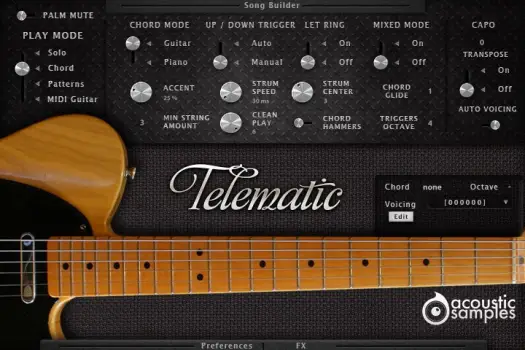
Chord mode panel
Chord panel: shows the chord you are playing and its octave. The Voicing menu lists every possible voicing of that chord on a guitar, and you can select one for each octave. Click Edit, change the chord, then Apply to override that voicing or Insert to add it to the voicings available for that chord. Export and Load save and recall a chord configuration, including the song builder settings
Chord Mode: Guitar separates the note selection from the triggers: pressing a chord with the left hand only makes the soft sounds a left hand makes on a real guitar, and the right hand triggers the chords or single strings. Piano plays the chord as soon as you press it, with upstrokes and downstrokes chosen automatically from the position in the bar; release and replay any note of the chord to repeat it. It is more intuitive, but allows less detail and realism
Up/Down Trigger: on Manual, C4 strums down and D4 strums up. On Auto, C4 strums up or down depending on the position in the bar
Let Ring: whether the chord stops when you release your right hand - handy for fast or complex chord progressions
Mixed Mode: a mix of the solo and chord modes. Play one note at a time, or two as a legato, and it plays single notes or hammers and slides as set in the solo mode; play three notes or more, or two at once, and it strums the chord as in the piano mode
Accent: how hard you must play to trigger all 6 strings. Min String Amount sets the minimum number of strings played in a strum at the lowest velocity
Strum Speed: the overall time taken to strum all 6 strings
Strum Center: your right hand's position over the strings: at the top (1) you hear more of the first and second strings, at the bottom (6) more of the last two
Clean Play: how clean and precise the playing is: at 6 the engine always uses clean samples, at 1 it mostly uses samples of notes that were not pressed well
Chord Hammers: plays the hammer-ons and pull-offs between one chord and the next - probably what makes the library most realistic
Capo: simulates a real capo. With Transpose off, an E chord with the capo at fret 1 sounds as an F; with it on, the E stays an E and the engine looks for an alternate position starting from the capo - useful to play chords high on the neck
Auto Voicing: uses different chord positions depending on the octave you play in. Turn it off on a small controller, or to always play the first position
The patterns mode uses the same chord recognition as the chord mode, but its triggers play patterns instead of single strums. Loop them, fit them to the tempo or the time signature, change their velocity in real time from a controller, sync them to your host and add groove. Pick from a large selection, assign one to each trigger, and a full song takes a few clicks.
The Pattern Maker creates your own strumming and picking patterns in seconds, and they can be as long as you like. Save them and send them to other users - the pattern collection can only grow.
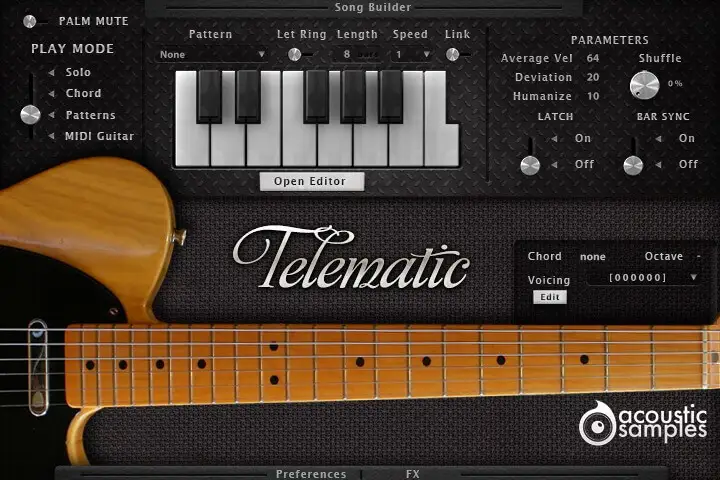
Patterns panel
Triggers: assign 13 patterns of your choice to 13 notes, from C4 to C5, or click the keys on the interface. Starting a pattern stops the previous one, releasing the key stops it, and the velocity you play sets the velocity of the whole pattern
Let Ring: whether the "off" events in the pattern are played
Length: the length of the pattern, from 1 to its full length, to fit the time signature of your song (odd numbers too)
Speed: plays the pattern at other speeds, half or double for example
Link: makes Let Ring, Length and Speed global for all patterns, or applies them to the selected pattern only
Average Vel: the centre velocity of the pattern. It starts at the velocity of the trigger and can be modulated from a MIDI controller - the modulation wheel by default
Deviation: the spread between the lowest and highest velocities of the pattern's events, also modulatable in real time
Shuffle: adds groove without quantizing, so the playing stays realistic
Latch: when on, a key starts the pattern and pressing it again stops it
Bar Sync: a pattern only starts at the next bar - useful when working in a sequencer
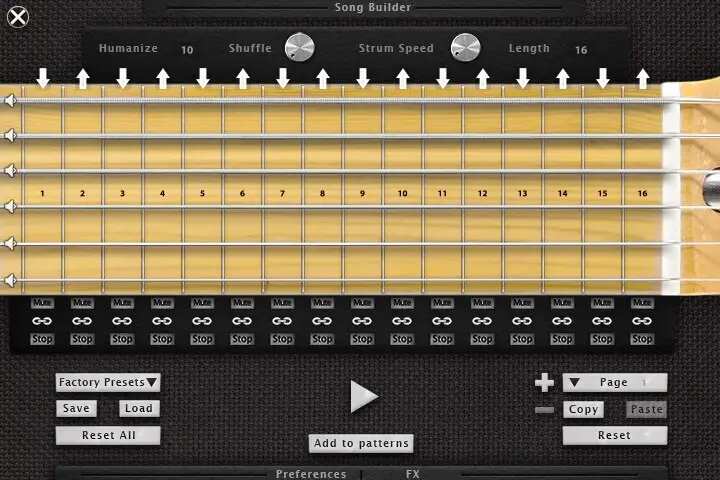
Pattern Maker
Grid: a step sequencer made for guitar strumming: each fret is a quarter note, and you can add a whole chord or, with the link icon off, a single string. Events on the same step are strummed with the strum engine's settings
Velocity: select an event and drag over it; a velocity of 0 removes it
Arrows: the up and down arrows at the top set the strum direction
String mute: the speaker icon to the left of a string mutes it completely
Mute and Stop: each step's Mute button plays a muted chord, and Stop releases the chord at the end of the step
Strum Speed: the strum speed of the pattern
Shuffle and Humanize: general controls, the same as on the patterns panel
Pages: create as many pattern pages as you want for variations on one key; copy, paste and reset a page or the whole pattern. Import the factory presets and modify them, save and reload your patterns, preview them, and Add to patterns puts them at the bottom of the patterns list

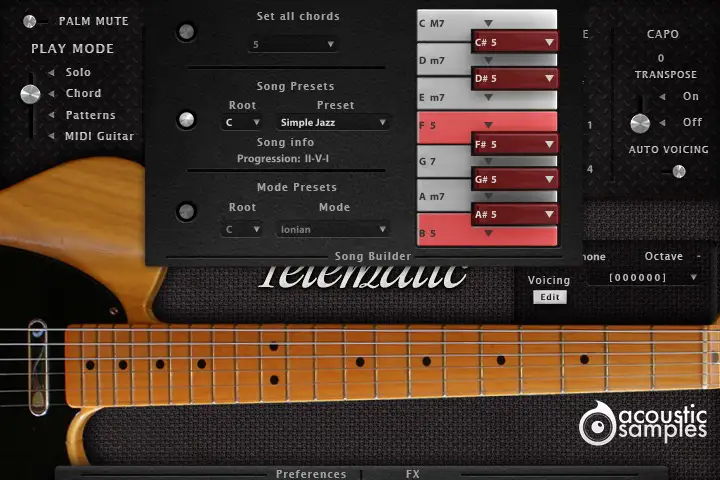
Playing a series of chords can be hard, especially if you are not an advanced keyboardist. The song builder lets you choose the chord each single note triggers - press C alone and it plays C major, for example - for all 12 notes of the octave, so your songs are easy to build and to play.
Presets give you song ideas, chord progressions, modes and chord types. Combine them with the patterns, and pressing two keys at once is enough to play a song.
Song builder
Availability: the song builder works in the chord mode and the patterns mode
Set all chords: puts the same chord on all 12 notes
Song presets: predefined songs with their chord progressions; change the root if needed, and Song info shows the progression
Mode presets: most musical modes with their chord progressions, again with a selectable root
Chords: set the type and the root of each chord, so a song can use different chords on the same root note. Keys shown in red after choosing a preset play a "5th": there is no valid chord for that note in the song or scale. You can set any chord by hand, even starting from a preset
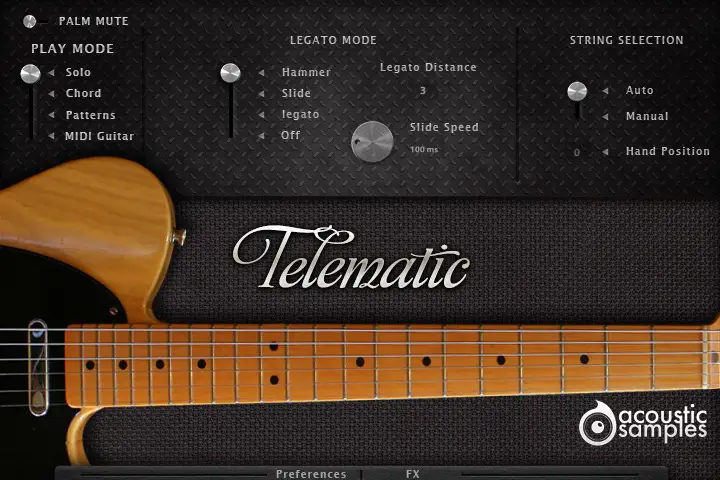
The solo mode is made for melodies. A piano has only one middle C, but a guitar offers several places to play it: a smart hand position system decides where a real guitarist would put their hand and which string they would play. You can turn it off and stay in the first position if you prefer.
The legato engine automatically plays legato notes, hammer-ons, pull-offs or slides within the legato distance you set, and keyswitches give you palm mutes, harmonics (flageolets), percussion sounds and control of the legato engine.
Solo mode panel
Legato Mode: what plays when you play legato (press C2, then C#2 before releasing C2): Hammer plays hammer-on and pull-off samples, Slide plays slides up and down, Legato plays regular sustains but still stops the first note, and Off turns legato off
Legato Distance: the interval within which the legato applies
Slide Speed: the speed of the slides, in the Slide legato mode
String Selection: automatic string and fret selection, or the hand constrained to the first position or a position of your choice
Keyswitches
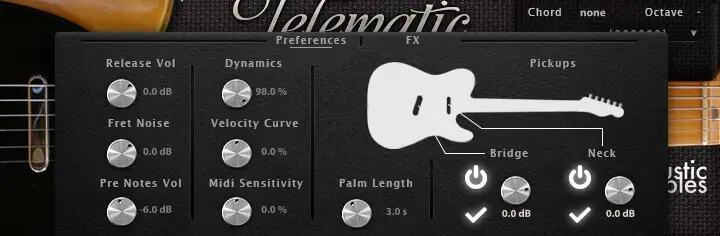
Both the bridge and the neck pickups were recorded, and you can set the volume of each. Everything else can be tweaked too: the release, fret noise and pre-note volumes, and the MIDI response of your keyboard.
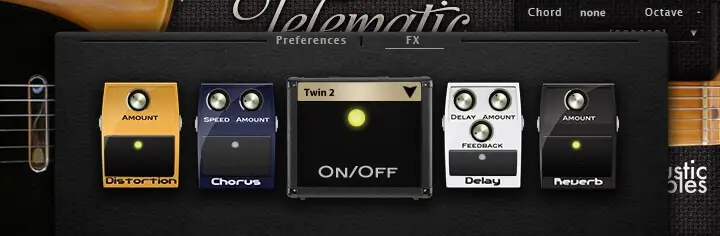
The FX panel adds distortion, chorus, amp and cabinet modelling, a tape delay and a spring reverb. And if you own a MIDI guitar, the MIDI mode expands its sounds: select the MIDI channel of each string and you are ready to play.
Preferences panel
Release Vol: the volume of the release samples
Fret Noise: the volume of the automatic fret noises, heard when the left hand moves in solo mode and when you change chord in chord mode
Pre Notes Vol: the volume of the soft noises your left hand makes when selecting a chord in the chord mode's Guitar setting
Dynamics: the volume of the lowest velocity
Velocity Curve: how the volume responds to velocity
Midi Sensitivity: a MIDI remapper: how hard you need to press a key to reach a given velocity
Palm Length: how long the palm mutes last
Bridge / Neck: load and mix the two pickups as you like
FX panel
MIDI guitar
Strings MIDI channels: select the MIDI channel of each of the 6 strings. You may need Set patch as omni so the instrument responds on all MIDI channels
Sample player
Telematic V3 comes with its own sample player, the UVI Workstation 3 (requires v3.1.6 or later). We provide it for free with every library that you buy, you don't need to buy an expensive sampler to use our products. It works on Mac (10.14 or later intel or arm processor) and PC (windows 10 or later), in standalone or as a plugin (VST / VST3 / AU / AAX) and in 64 bits only. You can find more info about it here.
Copy Protection
We use the iLok system to protect our products and you can choose to register your license to your computer or to an iLok dongle. If you decide to use an iLok dongle, both V1 and V2 are compatible with our products. You can activate your license on up to 3 computers or iLok dongles at the same time and you can deactivate one and activate another as many times as you want.
There are no reviews yet. Be the first to write one.
We use Google Analytics to count visits and see which pages are read. Nothing else is tracked, and nothing is shared with advertisers. More about cookies.