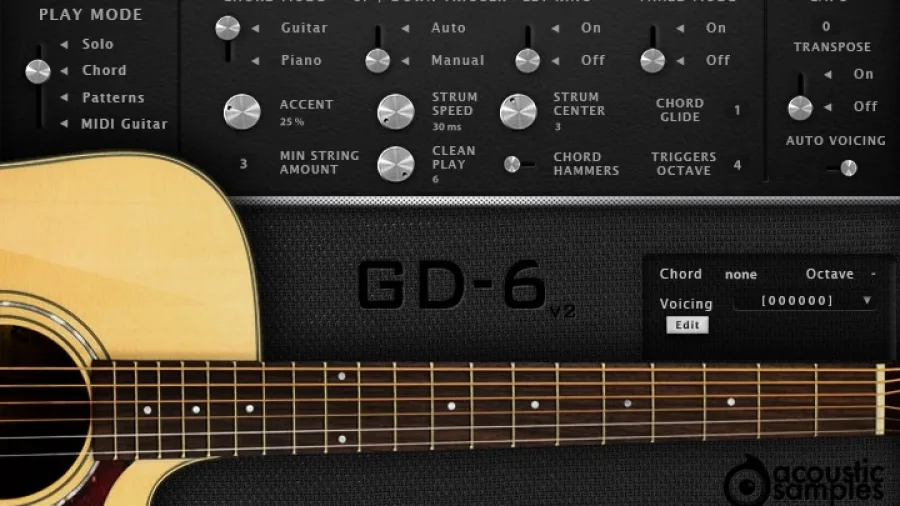
It was recorded using the built-in pickup and a pair of microphones, and was sampled in immense detail; we captured all frets of all strings with upstrokes, downstrokes, round robins, releases, staccatos, mutes, palm mutes, hand blocks, slides, hammer ons, pull offs, retriggers, fret noises, percussions and more. All of these details enable users to accurately and easily reproduce the real playing of a guitar player.
There are 4 modes for playing:
1. The Solo mode (for free playing, melodies etc)
2. The Chord mode (to aid strums and picks)
3. The Patterns mode (automatic strumming & picking)
4. MIDI mode (for any MIDI guitar controllers).
These modes can be selected via the use of keyswitches, or by simply clicking and dragging the dial on the interface.
The GD-6 acoustic guitar can strum, in various ways, up, down, muted, in legato and allows picking. Everything is modeled after meticulously analyzing thousands of real chords played by guitarist. Every aspect of the strumming engine can be tweaked to achieve the sound you want.
The chord recognition engine helps converting any chord you play on your keyboard to a real guitar voicing. Recognizing a chord is made through a database of thousands of standard chords, and you can edit every chord or even add new ones.
The chord hammers feature lets you play left hand hammer ons and pull offs while strumming or picking.
The triggers are set from C4 to C5.
A small chord panel displays the chord that you are playing as well as the octave it is in. Right under it, you have access to a voicing menu that contains all of the possible voicings of that chord on a guitar, and you can select one for each octave.
In this panel, you can edit the chord you are currently playing, so just click on the edit button, then change the chord and hit apply to override that chord voicing, or press insert to add that chord to the list of available vicings for that chord.
You can even export and load a chord configuration using the export and load buttons. The chord configuration will also contain the information present in the chord builder if you used it.
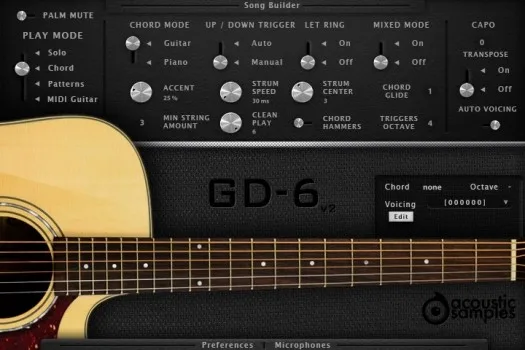
The Chord Mode can be set in two positions,
The UP/DOWN Trigger controls if the automatic strum up and down is engaged. If set to manual, C4 is the strum down and D4 is the strum up. If set to Auto, C4 acts as a strum up or down depending on the position in the current bar.
The Let Ring controls wether the chord stops when you release your right hand. This can be handy for fast/complex chord progressions.
The Mixed Mode is as its name implies a mix of the solo mode and the chord mode. If you play chords a regular melody with one note at a time or two as a legato, it will play single notes or hammers and slides as selected in the solo mode If you play 3 notes or more or play two notes simultaneously, the chord mode is engaged and it will strum that chord just like in the piano mode.
The Accent, Strum Speed and Strum Center are all linked to the chord simulation. We extracted the data from hundreds of real guitar strums and allow you to control these parameters.
The Clean Play controls how dirty and precise you want the playing to be, if set at 6, the engine will always use clean samples, but if at 1, it will mostly use samples of "not pressed well" notes.
The Chord Hammers is probably whatmakes the library the most realistic. It allows you to go from one chord to another and play the hammer ons and pull offs between them.
The Capo simulates a real capo, you can choose to make it transpose the chords or not, transposing can be useful if you want to play chords high on the neck.
The Transpose is related to the Capo function. And it will decide if the Capo actually transposes the chord or not. For example an E chord with the Capo at fret one will sound like an F chord without the transpose function, if you enable it, the E chord will stay an E chord, but the engine will look for an alternate position to play it starting from the capo.
The Auto Voicing feature enables the different guitar chord positions depending on the octave in which it is played. You can disable it if you play on a small controller or just want to play the first position.

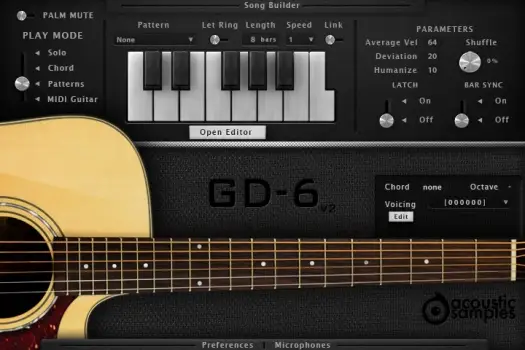
The patterns mode is very similar to the chord mode, the chord recognition engine works the same way, but this time the triggers are not simple strums anymore, they are a set of patterns that you can loop, adapt to the tempo or the metrics, change the velocity in real time using a controller, synch to your host, add groove to.
You can choose from a large selection of patterns or create your using the pattern maker and assign them to each trigger to create a full song in a few clicks.
You can assign 13 different patterns of your choice to 13 different notes. Clicking on one of the keys on the interface will launch the pattern, triggering another one will stop the first one and start the new one. You can also trigger the patterns from the keyboard using the notes from C4 to C5. By default releasing the keys will stop the pattern. The velocity at which you press the key will determine the velocity of the whole pattern.
The Parameters can change a few aspects of the current pattern.
Creating realistic guitar patterns has never been easier. You can create strumming and picking patterns in seconds and even make them of an infinite size.
We even made the sharing of these patterns easy, just save them and send them to other users, the database can only grow!
Make sure that you check the patter maker video from the Sunbird library to get an idea of how it works.
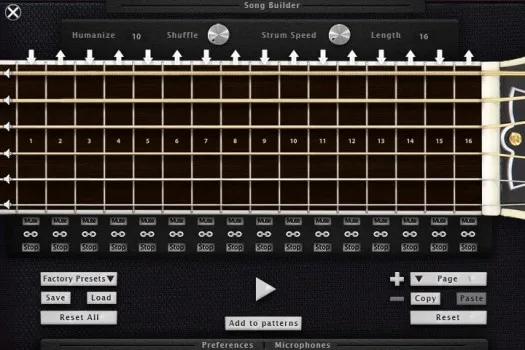
The Pattern Maker is an improved step sequencer made especially for guitar strumming. Each fret represents a quarter note and you can either add a whole chord or just a single string (if the link icon is unselected). If multiple events are in the same step, they will be strummed following our strum engine parameters.
You can control a few aspects of the pattern you create.
You can create as many pattern pages as you want, giving you access to many variations by just pressing one key. Of course you can copy the content of one page to another, reset a page or the whole pattern. You can also import the factory presets and modify them as you want, save your patterns, reload them and preview or add them to the pattern list. Once you click the "Add to pattern" button, the pattern you created will appear at the bottom of the patterns list in the pattern panel.
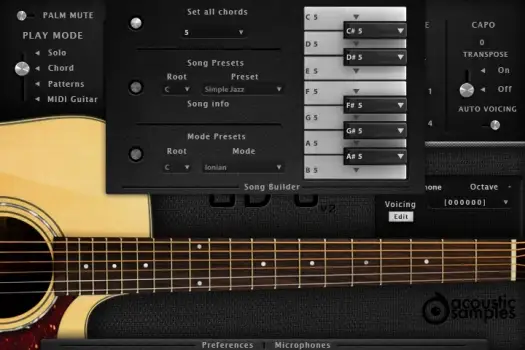
The song builder panel is the feature that will let you compose songs extremely quickly. Sometimes playing a series of chords can be complicated, especially if you are not an advanced keyboardist. The song builder allows you to decide which chord will be triggered when selecting only one note. For example pressing only the C will be recognized as a C Major. You can repeat the operation for the whole 12 notes of the octave and this way construct your songs and play them easily.
We included a selection of presets to give song ideas, chord progressions, modes or chord types.
Combine this with the patterns and pressing two keys at the same time is enough to play a song.
The song builder is available in chord mode or in patterns mode.
You can use set all chords using the first menu, it will put the same chord on all of the 12 notes.
The song presets are a set of predefined songs with the right chord progressions, you can change the root if needed and the progression is detailed under song info.
The mode presets is a list of most music modes and their corresponding chord progressions, you can change the root of needed.
You can now change the type of each chord along with its root. So it makes it easy to play songs that have different chords for the same root note.
When selecting one of the presets, some keys will appear in red and the corresponding chord will be a "5th". This means that there is no "valid" chord for this note in the selected song or scale. You can of course set each chord manually by clicking on them and selecting its kind, even starting from a preset.
The solo mode is very simple, and is suited to play melodies. It uses a smart hand position system that decides for you where a real guitarist would put his hand and which string he would play. A piano only has one middle C for example, but a guitar offers a few different options and our script will decide it for you. You can of course deactivate it and use only the first hand position if you want.
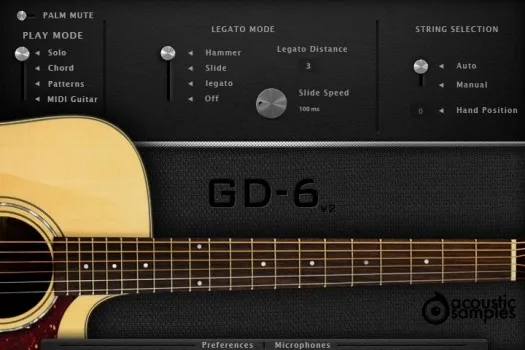
The GD-6 acoustic guitar features our powerful legato engine that will automatically trigger legato, hammer ons, pull offs, or slides and the legato distance will define the maximum interval in which the legato will apply.
You also have access to key switches to play palm mutes, harmonics (flageolets) or even percussion sounds and control the legato engine.
The legato mode controls which sample will be triggered when you play legato notes on your keyboard, for example press C2 and then C#2 without depressing C2.
The legato distance controls the interval in which the legato function is active.
The slide speed is active only when the Slide legato mode is selected and controls the speed of the slide.
The string selection enables the automatic string and fret selection or constrains the hand to the first position or the position of your choice.
Here is a list of the keyswitches.
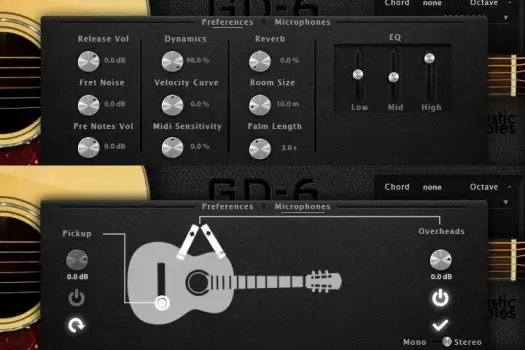
The GD-6 acoustic guitar library comes with 2 microphones perspectives, a stereo pair and the DI output and you can adjust the volume of each of them.
Every aspect of the library can be tweaked, the release, fret and pre-notes volumes, as well as the midi response of your keyboard.
A three band EQ and a reverb module can be adjusted from the preferences panel, and you can enable and load/unload the pickup or the microphones.
The Preferences panel / Microphones mixing panel can be opened by clicking at the bottom of the interface, in there you have access to all of the different parameters of the library.
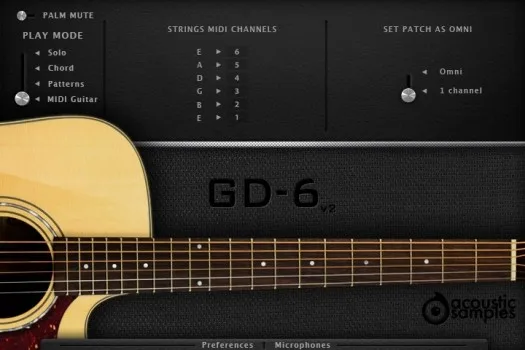
If you own a MIDI guitar and want to expand its sound capabilities, then the MIDI mode is for you, all you need to do is select the 7 different MIDI chanels your guitar outputs and you are ready to play.
The MIDI guitar mode allows you to play the GD-6 acoustic guitar using a midi guitar controller, all you need to do is select the 6 midi channels. You maybe have to use the set patch as omni to allow the plugin to respond to all midi channels.
Sample player
GD-6 Acoustic Guitar comes with its own sample player, the UVI Workstation 3 (requires v3.1.6 or later). We provide it for free with every library that you buy, you don't need to buy an expensive sampler to use our products. It works on Mac (10.14 or later intel or arm processor) and PC (windows 10 or later), in standalone or as a plugin (VST / VST3 / AU / AAX) and in 64 bits only. You can find more info about it here.
Copy Protection
We use the iLok system to protect our products and you can choose to register your license to your computer or to an iLok dongle. If you decide to use an iLok dongle, both V1 and V2 are compatible with our products. You can activate your license on up to 3 computers or iLok dongles at the same time and you can deactivate one and activate another as many times as you want.
I am an owner of one the acoustic guitar products sold by acoustic samples. While the samples are excellent , so are the demos , I really find it hard to create the same level of demos that are advertised. I would really appreciate if acoustic samples also provides demo MIDI files so users can get to know how to use these instruments HANDS ON .
Amazing sound, Super for me VSTi
love this software. great detail, wonderfully overtones and a wealth of features that I haven't begun to master yet. if you are looking to add acoustic guitar backing tracks using your keyboard, you can't do much better than the GD6. It has a clean but warm tone that should be useful in just about any genre of music. I only wish piano vet's could sound as realistic as the GD 6.
Great, natural sound. A wealth of options. However, there is one thing that bothers me. When you are basically a keyboard player and have selected Solo mode, you sometimes tend to go too low on the keyboard with your left hand. If those keys (D1 and below) were silent, it wouldn't matter much. But all too often I hit the D1 or C1 key and as a result get an unwanted percussion sound. This is even more accentuated by the fact that there is no barrier between the lowest normal key (E1) and the highest percussion key (D1). I think it would be a great improvement if those special percussion keys optionally could be disabled in Solo mode. Still, it is a rock solid piece of software.
I let me be the first to review GD 6. ITS GREAT! THE BEST ON THE MARKET! I own several acoustic guitar programs and GD 6 is the most realistic, I have found. The samples are extremely clear. The picking/strumming loops begin and fade seamlessly. The song writing and pattern mode are more than enough to get you started. Using GD 6 with your DAW effortless. Combing GD 6 with other guitar programs will only enhance the creative and musical production you are trying to create. I brought GD 6 last night and I've been working with it all day. Don't waste your money on cheaper samples and loops. This is the best BANG for the BUCK.
TMWISE - Producer/Artist
We use Google Analytics to count visits and see which pages are read. Nothing else is tracked, and nothing is shared with advertisers. More about cookies.