

User guide

A piano VST with a difference - Old Black Grand is a 1928 Pleyel (Chopin's favourite make) sampled using vintage gear.
Overview
A 1928 PLEYEL GRAND
OldBlackGrand is a Pleyel grand piano, an F-71240 model built in 1928, with a warmth and depth of sound that is seldom heard in today's pianos.
We sampled it with appropriately vintage gear - a Studer console and tube microphones - from two microphone positions: around 3000 samples, with 9 velocity layers for the sustain and 9 for the release, plus key noises and sustain pedal noises.
Interface
Features
Non plus ultra
Pleyel & Cie was founded in 1807, and its pianos were the instruments of choice for Debussy, Ravel, Stravinsky and Saint-Saens. Chopin famously called them 'non plus ultra' - pianos would never get any better than this.
If you already own dozens of virtual Steinway Bs and Ds, this is a different voice. It serves jazz just as well as the classical repertoire, particularly in the style of the golden years, and the demos are played by Jean-Michel Bernard (former composer for Ray Charles, film music composer) and Romain Collin, a French jazz pianist based in New York City.
Close and side microphones
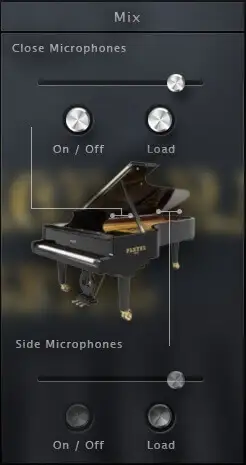
The Pleyel was recorded with two microphone positions. The close pair sits near the strings inside the piano, for deep bass and rich resonances; the side pair sits in the well of the piano and leans towards the listener's perspective.
Mix them individually to tailor the sound, or unload the one you do not use to save RAM.
More about this
Mix
Gain: the level of each microphone position.
On / Off: enables or disables each position.
Load: loads or unloads the samples of each position. If you only use one, unload the other to save RAM; the controls are greyed out while a position is unloaded.
Resonances
When all the strings of a piano start resonating, they give it a kind of natural reverb. Two resonances matter most: the pedal down resonance, and the sympathetic resonance between held notes.
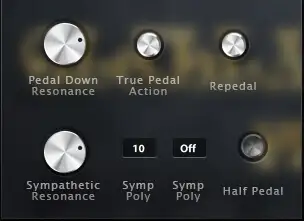
Both are in OldBlackGrand and each can be adjusted on its own, including the true pedal action - the progressive resonance when you press the pedal after the chord.
More about this
Resonance
Pedal down resonance: the amount of resonance when you press the sustain pedal.
True pedal action: the progressive resonance you hear when you hold a chord and press the pedal afterwards.
Sympathetic resonance: the volume of the sympathetic resonance between held notes. Raise it if you want the harmonics to sing out more.
Symp poly: how many voices are allowed for the sympathetic resonance.
Re-pedalling and half pedalling

On a real piano the pedal is not a simple on/off switch, and classical players use a range of techniques. Re-pedalling lets you catch a chord released with the pedal before its decay has ended - especially useful to blend chords together.
Half pedalling is the sound of the pedal pressed half-way: a distinct variation, with a much quicker decay in the lower register. The size of its CC zone can be set from the interface.
More about this
Half pedal
Half pedal: enables or disables the half pedal from the interface.
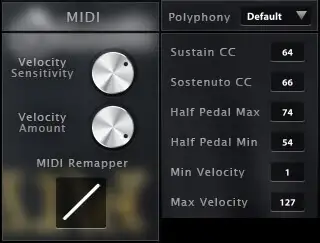
Half pedal min / max: the lowest and highest sustain pedal CC values of the zone where the half pedal effect happens.
Preferences and MIDI controls
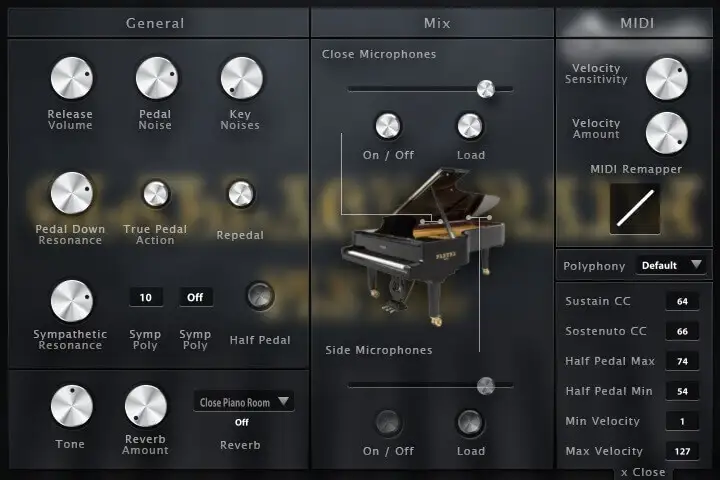
OldBlackGrand is in its third version. It is very playable straight out of the box, and the preferences let you fine-tune the release volume, key and pedal noises, tone, reverb, polyphony and a software round robin.
The MIDI controls added in V3 let you set the sustain and sostenuto CCs - to use an expression pedal instead of an on/off pedal, for example - and adjust the MIDI curve, dynamics and velocity response to your keyboard and playing style.
More about this
Preferences
Release volume: the sound produced when you release a key while a note is being sustained.
Key noises: the sound produced when you release a key and no note is sustained.
Pedal noise: the sound of the pedal being pressed or released, triggered automatically.
Tone: a quick way to make the piano sound brighter or darker.
Round robin: a software round robin, to switch on for pieces with lots of repeated notes.
Polyphony: raise or lower the number of voices - lower it if you reduce the buffer or want to be lighter on CPU.
Reverb: a convolution reverb with separate dry and wet levels and a generous selection of high quality impulse responses.
MIDI
Velocity sensitivity: shapes the volume curve, making it easier to reach the loudest layers without changing the lowest and highest volume.
Velocity amount: sets the dynamics - the minimum volume given to the lowest velocity.
MIDI remapper: sets the mapping, i.e. which velocity layer answers which input velocity.
Min and max velocity: the minimum velocity needed to make a sound and the maximum velocity that can be reached.
Sustain CC: 64 by default, can be moved to any other controller.
Sostenuto CC: 66 by default, can be moved to any other controller. The sostenuto (middle pedal) sustains only the notes held when it is pressed, while the others stay dry.
Technical specifications
Sample player
OldBlackGrand plays in UVI Player (formerly UVI Workstation), UVI's free sample player. We provide it with every library you buy, so you don't need an expensive sampler to use our products. It works on Mac (macOS 10.14 or later, Intel or Apple silicon) and Windows (10 or later), standalone or as a plug-in (VST / VST3 / AU / AAX), in 64-bit only. More about it here.
Copy protection
We use the iLok system to protect our products and you can choose to register your license to your computer or to an iLok dongle. If you decide to use an iLok dongle, both V1 and V2 are compatible with our products. You can activate your license on up to 3 computers or iLok dongles at the same time and you can deactivate one and activate another as many times as you want.
Video tutorials
- Overview & walkthroughyoutu.be/Y4l4yO6sTjo
- Video1youtu.be/Y4l4yO6sTjo
- Video2youtu.be/GTdPaZzqf4M