
User guide
Elektron
The Elektron library is a Godin Multiac electro-acoustic guitar with nylon strings.
Overview
NYLON, PLUGGED IN
Elektron is a Godin Multiac electro-acoustic guitar with nylon strings.
It is sampled in depth: around 2031 samples, with 10 downstroke and 10 upstroke velocity layers played alternately (20 samples per note) and 16 release samples per note, plus hammer-ons, ghost notes and various fret noises.
Interface
Features
Solo lines and legato
In solo mode Elektron plays single lines the way a guitarist would: play legato and the notes are connected with real hammer-on and slide samples, with bends on the pitch bend wheel and/or aftertouch.
The legato mode decides what an overlapping note does - hammer-on, slide, plain sustain or nothing - and the legato distance sets the widest interval it applies to.
More about this
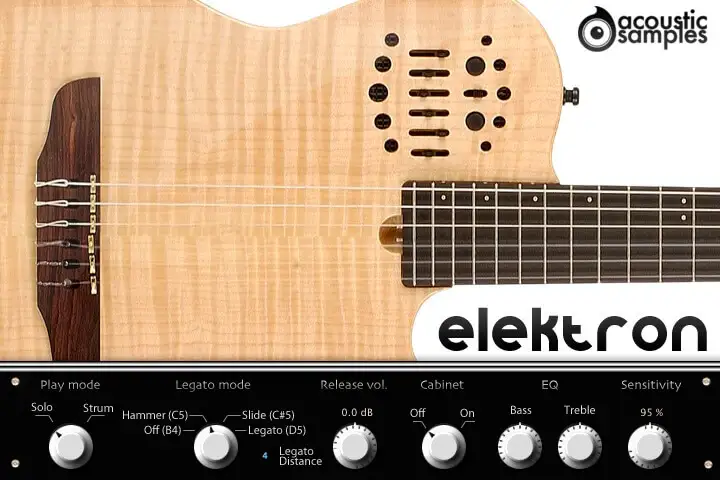
Default interface
Play mode: choose between the solo mode and the strum mode.
Legato mode: choose whether playing legato triggers hammer-ons, slides, sustains, or has no effect. The keyswitches are shown on the panel: Off (B4), Hammer (C5), Slide (C#5) and Legato (D5).
Legato distance: the maximum interval over which the legato applies.
Release volume: the level of the sound produced when you release a string while a note is ringing.
Cabinet: turns the cabinet simulation on or off.
EQ: adjusts the Bass and Treble of the parametric EQ.
Sensitivity: sets the minimum volume for velocity 1, from a narrow to the full dynamic range.
A strumming engine
Switch to strum mode and the engine recognises the chord you play and strums it like a guitarist, from a smart strumming technique rather than a simple arpeggio.
Piano mode strums the chord as soon as you play it. Guitar mode lets you hold the chord and strum it down and up from two keys, or pick the strings one by one - a little harder to play, but more realistic.
More about this
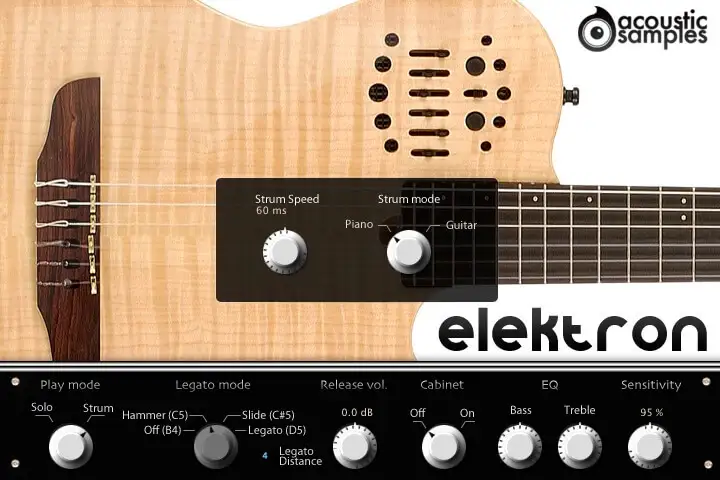
Strumming interface
The strumming interface has the same controls as the default one, plus:
Strum speed: the speed of the automatic strums.
Strum mode: choose between the Piano and Guitar modes.
Piano mode: play a chord and the engine recognises it and strums it right away; replay any note of the chord to strum it again.
Guitar mode: the chord you hold only defines what will be played: press C5 to strum it down, D5 to strum it up, or the notes above to play the strings one by one, for arpeggios for example. A little less easy to play, but more realistic.
Shape the tone
A Fender Frontman 212R cabinet simulation and an EQ with the same parameters as on the real guitar are on the front panel.
Every parameter, like the strum speed or the play modes, can be driven from any controller, so everything can be automated.
Technical specifications
Sample player
Elektron plays in UVI Player (formerly UVI Workstation), UVI's free sample player. We provide it with every library you buy, so you don't need an expensive sampler to use our products. It works on Mac (macOS 10.14 or later, Intel or Apple silicon) and Windows (10 or later), standalone or as a plug-in (VST / VST3 / AU / AAX), in 64-bit only. More about it here.
Copy protection
We use the iLok system to protect our products and you can choose to register your license to your computer or to an iLok dongle. If you decide to use an iLok dongle, both V1 and V2 are compatible with our products. You can activate your license on up to 3 computers or iLok dongles at the same time and you can deactivate one and activate another as many times as you want.