

User guide
KAWAI-EX PRO
We used 3 mic pairs to record this stunning and versatile Kawai EX Grand, which used to have its home at the Kennedy Center.
Overview
NINE FEET OF CONCERT GRAND
The Kawai-EX Pro is a powerful, bright 9-foot (276 cm) KAWAI EX concert grand that used to live at the Kennedy Center in Washington DC.
We made it together with Lance Herring - our second project with him after the AcademicGrand - and recorded it with three microphone pairs and state of the art gear: around 5000 samples, with 5 velocity layers on pedal up and 5 on pedal down, and three sets of 5 release velocities for different sustain lengths.
Interface
Features
Three microphone positions
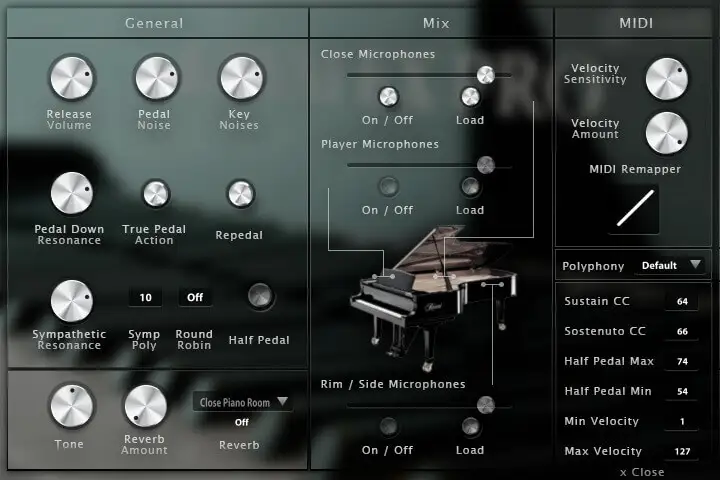
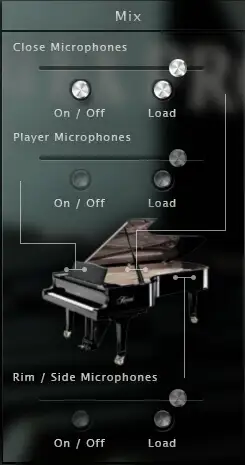
Three pairs of microphones give you three views of the piano. Close, inside near the strings, for deep bass and rich resonances; Player, next to the pianist's head, for the feeling of sitting at the keyboard; and Rim, at the side of the piano, for the perspective of a soloist playing with a pianist.
Each position can be enabled, loaded and mixed separately to get exactly the sound you want, and unloading the ones you do not use saves RAM.
More about this
Mix
Gain: the level of each microphone position.
On / Off: enables or disables each position.
Load: loads or unloads the samples of each position, to save RAM if you only use one. The controls are greyed out while a position is unloaded.
Resonances
When all the strings of a piano start resonating, they give it a kind of natural reverb. Two resonances matter most: the pedal down resonance, and the sympathetic resonance between held notes.
Both are in the Kawai EX Pro and you can set the amount of each, including the true pedal action - the progressive resonance when you press the pedal after the chord.
More about this
Resonance
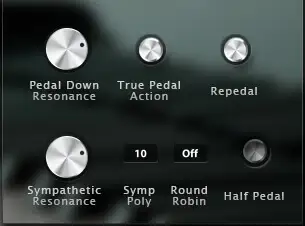
Pedal down resonance: the amount of resonance when you press the sustain pedal.
True pedal action: the progressive resonance you hear when you hold a chord and press the pedal afterwards.
Sympathetic resonance: the volume of the sympathetic resonance between held notes. Raise it if you want the harmonics to sing out more.
Symp poly: how many voices are allowed for the sympathetic resonance.
Repedalling and half pedalling

On a real piano the pedal is not a simple on/off, and classical players often repedal and half pedal. Repedalling lets you restart a chord released with the pedal before its decay has ended, to blend chords together.
Half pedalling is what happens when the pedal is only half pressed: the strings are not completely damped, so the decay is longer and you hear some resonance. The size of its CC zone can be set from the interface.
More about this
Half pedal
Half pedal: enables or disables the half pedal from the interface.
Half pedal min / max: the lowest and highest sustain pedal CC values of the zone where the half pedal effect happens.
Preferences and MIDI controls
The Kawai EX Pro is in V3, and the preferences keep everything from the earlier versions - release volume, pedal noise and key noise - alongside the tone, reverb, polyphony and a software round robin for repetitive pieces.
The MIDI controls let you move the sustain and sostenuto CCs - to use an expression pedal instead of an on/off pedal, for example - and adjust the MIDI curve, dynamics and velocity response to your keyboard and playing style.
More about this
Preferences
Release volume: the sound produced when you release a key while a note is being sustained.
Key noises: the sound produced when you release a key and no note is sustained.
Pedal noise: the sound of the pedal being pressed or released, triggered automatically.
Tone: a quick way to make the piano sound brighter or darker.
Round robin: a software round robin, to switch on for pieces with lots of repeated notes.
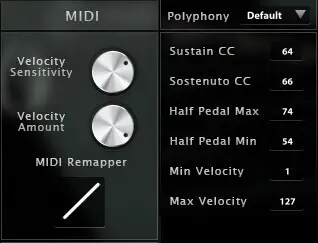
Polyphony: raise or lower the number of voices - lower it if you reduce the buffer or want to be lighter on CPU.
Reverb: a convolution reverb with separate dry and wet levels and a generous selection of high quality impulse responses.
MIDI
Velocity sensitivity: shapes the volume curve, making it easier to reach the loudest layers without changing the lowest and highest volume.
Velocity amount: sets the dynamics - the minimum volume given to the lowest velocity.
MIDI remapper: sets the mapping, i.e. which velocity layer answers which input velocity.
Min and max velocity: the minimum velocity needed to make a sound and the maximum velocity that can be reached.
Sustain CC: 64 by default, can be moved to any other controller.
Sostenuto CC: 66 by default, can be moved to any other controller. The sostenuto (middle pedal) sustains only the notes held when it is pressed, while the others stay dry.
Technical specifications
Sample player
KAWAI-EX PRO plays in UVI Player (formerly UVI Workstation), UVI's free sample player. We provide it with every library you buy, so you don't need an expensive sampler to use our products. It works on Mac (macOS 10.14 or later, Intel or Apple silicon) and Windows (10 or later), standalone or as a plug-in (VST / VST3 / AU / AAX), in 64-bit only. More about it here.
Copy protection
We use the iLok system to protect our products and you can choose to register your license to your computer or to an iLok dongle. If you decide to use an iLok dongle, both V1 and V2 are compatible with our products. You can activate your license on up to 3 computers or iLok dongles at the same time and you can deactivate one and activate another as many times as you want.
Video tutorials
- Overview & walkthroughyoutu.be/0E_TSkkWxBs
- Video1youtu.be/0E_TSkkWxBs